
If you’re a beginner trying to collect emails without paying for software on day one, MailerLite is one of the most-recommended free tools out there. So I created a real account, built a landing page, set up a subscriber list and a signup form, and pushed it live — all on the free side — to see how far a complete beginner can actually get. Here’s exactly what I did, what worked, what tripped me up, and the parts I did not test yet.
- Best for
- Beginners who want to start an email list + a simple opt-in page for free.
- Free plan
- Real and usable — subscribers, emails, landing pages and forms included.
- Watch out for
- Custom domain is paid-only; you must verify a sender domain before sending.
- My take
- An easy, genuinely free starting point — just plan for the setup steps below.
What MailerLite is (in plain words)
MailerLite is an email-marketing tool. In one place you can:
- Store your email subscribers in lists (they call them groups).
- Build signup forms and landing pages to collect those emails.
- Send newsletters and set up automated emails (welcome emails, sequences).
For a beginner building a first funnel, that covers the whole “collect the email, then talk to them” half of the job. The other half — the funnel/opt-in flow itself — you can do here too, or pair it with a funnel builder like the free plan I tested in my Systeme.io review.
What I actually did (hands-on)
I signed up with a real address, which started a 14-day trial of the paid features that then drops to the free plan. From the free side I went through a normal beginner setup:
- Created a subscriber group (“FunnelToolLab Lead Magnet”) to hold signups.
- Built a landing page — I used MailerLite’s AI builder to generate a first draft, then edited it by hand.
- Added a hero email signup form with a clear “Get the Free Checklist” call-to-action.
- Connected the form to my subscriber group so signups land in the right list.
- Filled in the page SEO title, keywords and description, and set search indexing to No (sensible for a test page).
- Published it. The live page came out on a MailerLite subdomain:
funneltoollab-checklist.subscribepage.io
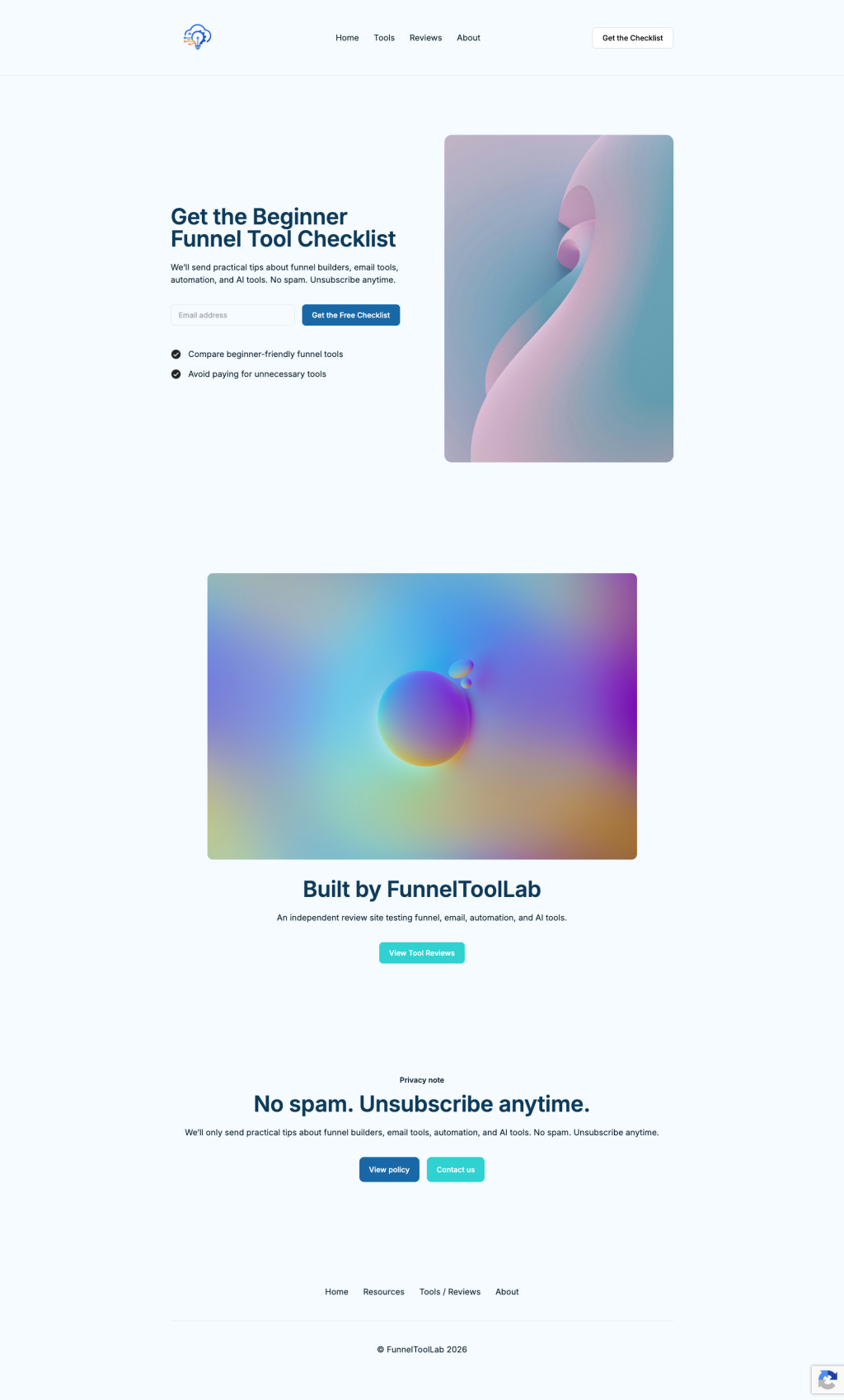
The editor was beginner-friendly. The AI builder gave me a usable first draft fast, and the drag-and-drop editing was straightforward — no code needed. Out of the box I could also see options for Google Analytics, Meta (Facebook) Pixel, click tracking, pop-ups and custom code, which is more than enough for a beginner.
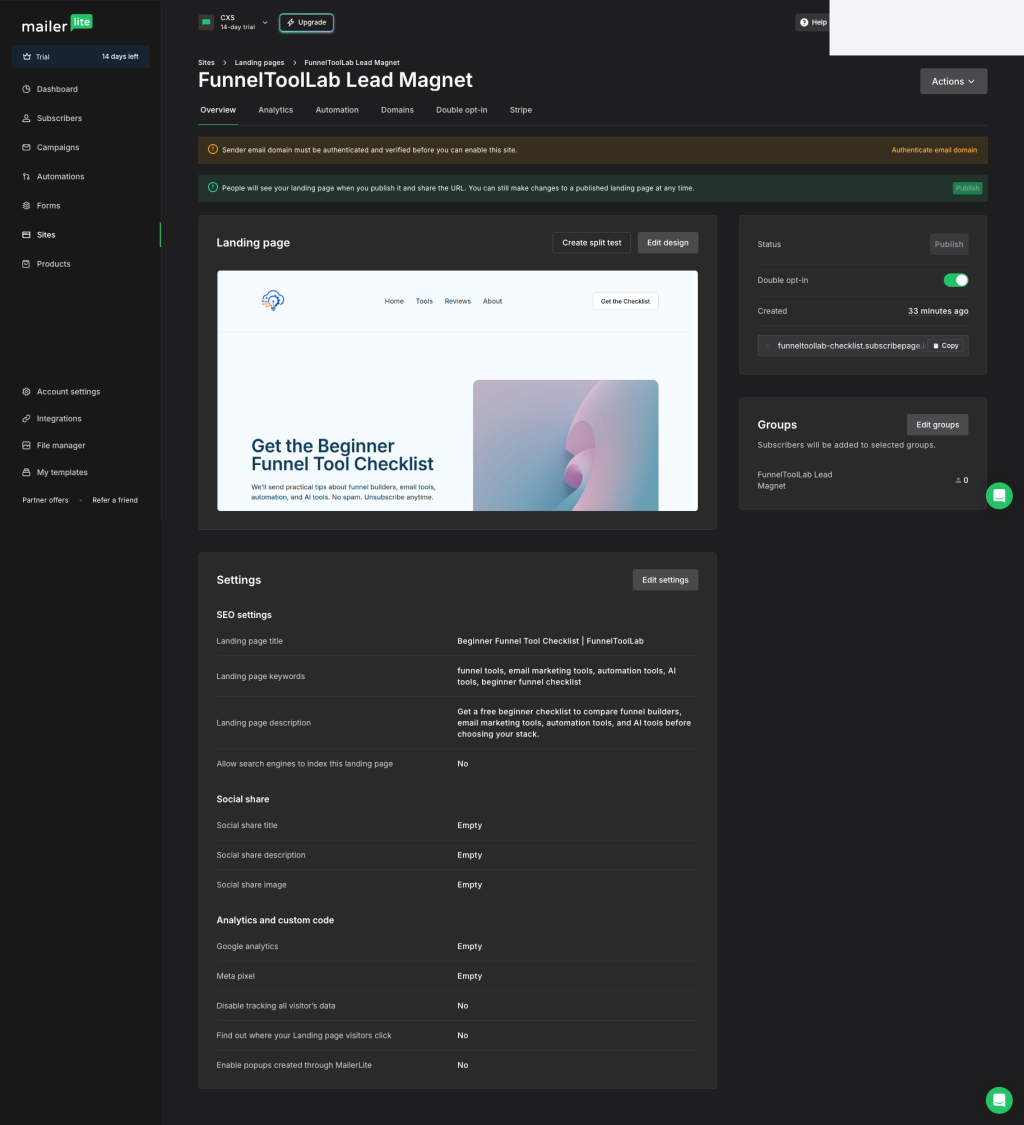
subscribepage.io subdomain, and the sender-domain warning (top).What I liked and what tripped me up
- Genuinely free to start — I built and published without paying.
- AI builder made the first draft fast, then I could hand-edit everything.
- List, form and landing page all in one tool — no plugins to wire up.
- Analytics, pixel and pop-up options available even on a basic page.
- Custom domain is not on the free plan — you’re on a
subscribepage.iosubdomain until you upgrade. - Before the site can send, your sender email domain must be authenticated and verified (a deliverability step, not optional).
- The free subdomain is fine to test, but isn’t the polished branded URL you’ll eventually want.
Neither of those two is a deal-breaker for getting started — but they’re exactly the kind of thing nobody tells beginners, so budget a little time for the sender-domain verification before you expect emails to actually go out.
Is the free plan actually enough?
For a beginner, yes — to start. The free plan let me create a list, build and publish a landing page, and set up a signup form without paying. MailerLite advertises a free tier that includes a subscriber allowance, a monthly email allowance, landing pages and forms (the exact numbers change over time, so check the current limits on their pricing page before you commit).
The two things that pushed toward a paid plan in my testing were the custom domain and removing MailerLite branding — the classic “free is real, polish costs money” trade-off. That mirrors what I found testing other free tools, like the “Powered by” badge in my Systeme.io review.
To keep this honest: I set up the list, form and landing page, but I did not run a full email automation / welcome sequence end-to-end, and I did not measure real inbox deliverability (whether emails reliably land in the inbox vs. spam). I also did not test the paid-plan features. I’ll update this review with those results once I’ve tested them properly — I won’t claim something works that I haven’t run myself.
My verdict
If you’re a beginner who wants to start an email list and a simple opt-in page without spending money, MailerLite is an easy recommendation to try. I built a real landing page on the free plan in well under an hour, the AI builder removed the blank-page problem, and everything I needed for a first lead magnet was in one place. Just go in knowing two things up front: the polished custom domain is a paid upgrade, and you’ll need to verify your sender domain before emails actually send. I’m not putting a number score on it yet — I want to test the automation and deliverability side first (see the box above) before giving a final rating.
You can build a list and a landing page for free, no credit card to start — exactly what I did above.
Try MailerLite Free →This is an affiliate link — if you sign up through it I may earn a commission at no extra cost to you. It does not change what I wrote above. See our affiliate disclosure.
Free AI Funnel Builder Starter Checklist
Get the simple checklist to plan your first funnel with AI tools, email capture, and beginner-friendly steps.
Download Free Checklist